
INSIZE ISM-DL300 and ISM-DL301
Digital Microscope with Measuring Software
The INSIZE ISM-DL300 and ISM-DL301 are all-in-one digital microscopes with built-in measuring software: step-zoom optics, a 1080p camera, a 13.3-inch LCD and the software in one set, with no PC to install. Magnify from 15X to 100X, measure down to ±4 µm and send results to Excel.
Prefer to talk? Call or WhatsApp an INSIZE engineer on +60 12-395 6288
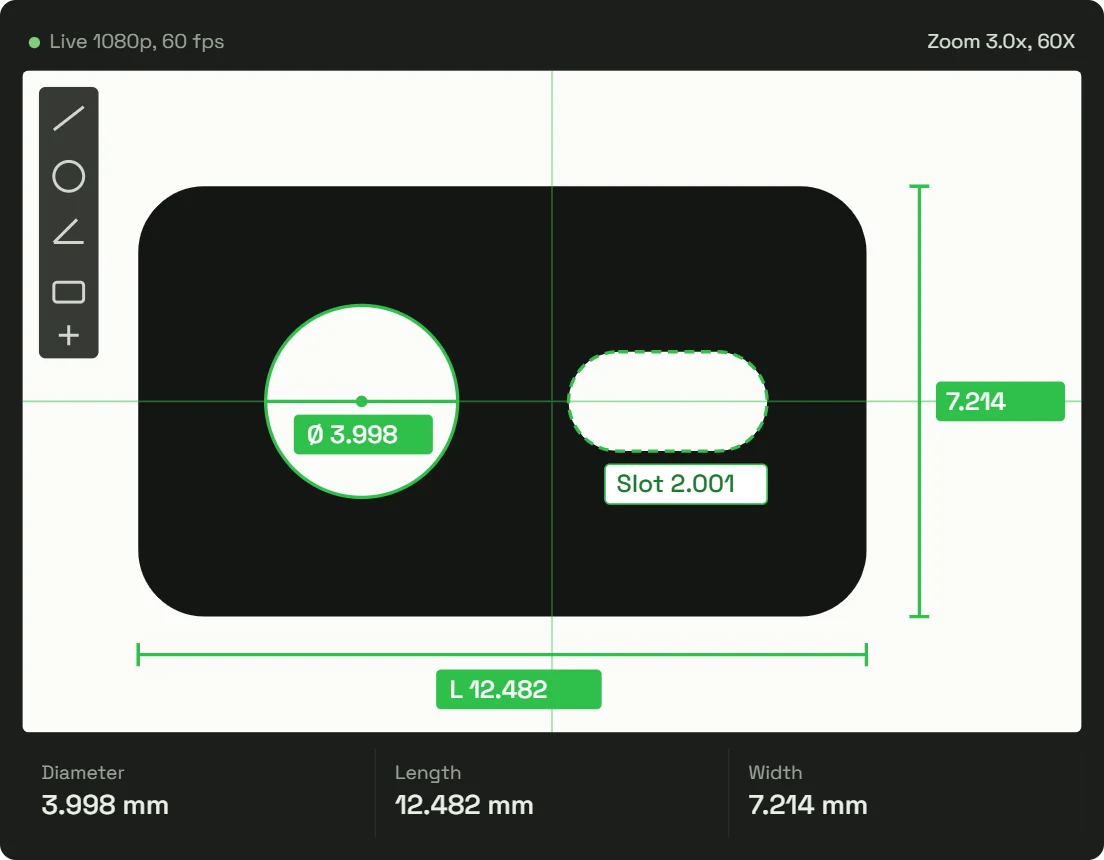

Illustration of the built-in measurement software. Switch the light to see what each model shows.
Magnification (up to 400X with optional lenses)
Accuracy at 80X–100X
1/2-inch CMOS camera at 60 fps
Max length in one field of view
ISM-DL300 or ISM-DL301: Which Digital Microscope Do You Need?
Both models share the same optics, camera, LCD and software. The only difference is lighting. If you need to measure outlines, holes or edge distances, you need the contour (base) light on the ISM-DL301.

ISM-DL300
For surface inspection: tool wear, scratches, markings and solder joints.
- Ring light (surface)
- Backlight
- Inspect and measure features visible from above
- Best for opaque parts and surface defects
ISM-DL301
Adds contour measurement: profiles, apertures and edge dimensions.
- Ring light (surface)
- Backlight (base)
- Backlit silhouette gives a sharp edge for automatic edge finding
- Separate brightness control for ring and contour light
Not sure? INSIZE recommends the ISM-DL301 whenever you measure workpiece contours, because the backlit edge is advantageous and produces accurate measurements.
See the Digital Microscope Measure a Real Workpiece
A Malaysian manufacturer replaced a multi-unit microscope setup with the ISM-DL301. Here is what changed on their inspection bench.
Microscope, monitor, PC and software installed separately, in a workshop with oil and dust.
Clear images, accurate measurement, and operation any inspector can learn.
One unit with built-in software. Inspectors trained in 30 minutes. Results exported to Excel and images saved to USB at the machine.
We don’t recommend a microscope for how advanced it is. We recommend it for your parts and your inspection process.
INSIZE Malaysia applications team
Read the video transcript
Many factory measurement microscopes come as a set of separate units: the microscope itself, a monitor, a computer and independently installed software. Over time, configurations become more complex and workshops fill with oil and dust. This time we recommended the INSIZE ISM-DL301 digital measuring microscope to our client. Their needs were simple: clear visuals, accurate measurements and straightforward operation.
The ISM-DL301 has built-in measurement software, so there is no need for an external computer. Just plug it in and start working. Quality inspectors can be trained and ready in 30 minutes.
What matters most is what you are measuring. To inspect surface details or tool-edge wear, switch on the ring light for a crystal-clear view. To measure contours, apertures and edge dimensions, turn on the base illumination, place the workpiece and the contour appears instantly. The software includes multiple tools for one-click measurement of different dimensions.
With a continuous zoom lens, parts of different sizes can be measured in the ideal field of view. Measurement data can be exported to Excel in one click, and inspection images saved directly to a USB drive, keeping quality control in step with production wherever it goes.
When we recommend equipment, we don’t just talk about how advanced a microscope is. We recommend a solution tailored to your workpieces, inspection process and requirements. If you have parts that are difficult or cumbersome to measure, send them to us and we will help you find the best way to measure them.
Built for the Shop Floor, Not the Lab
Everything an inspector needs comes in one set, controlled with a mouse. Nothing to install, license or update on a PC.
No PC required
Measurement software runs inside the unit and shows on the included 13.3-inch LCD. Plug in and start measuring.
Operators trained in 30 minutes
Easy to use and for operatiors to master. One-click tools operated with a mouse.
Results straight to Excel
Send measurement data to a spreadsheet for your QC records.
Save images to USB
Capture inspection photos at the machine. A 16 GB USB flash disk is included.
Automatic edge finding
The software finds the measurement edges for you, which reduces manual measurement error.
Auto white balance and exposure
Consistent images across shifts, with adjustable brightness, contrast and gain.
How to Measure a Part with a Digital Microscope
The same five steps for every part, whether it is a stamped bracket or a cutting insert.
Choose the light
Ring light for surface detail and tool-edge wear. Contour (base) light on the ISM-DL301 for outlines.
Place the workpiece
Set the part on the stage. With contour light the silhouette appears instantly.
Set the field of view
Use the 0.75X–5X step-zoom and 2 µm fine focus to frame the feature, from 16 × 11 mm down to 2.5 × 1.6 mm.
Measure in one click
Pick a tool. Automatic edge finding locates the edge and shows the result.
Save and export
Send results to Excel and save the image to the USB flash disk.
Get a quote, site visit or send us a sample and we will measure it for you, free of charge.
ISM-DL300 / ISM-DL301 Digital Microscope Specifications
From the INSIZE ISM-DL300/DL301 datasheet. The highlighted row is the only difference between the two models.
| Specification | ISM-DL300 | ISM-DL301 |
|---|---|---|
| Magnification | 15X–100X (standard 0.5X camera adapter + 1X auxiliary objective); up to 400X with optional adapter and objective | |
| Step-zoom lens | 0.75X–5X | |
| Field of view (standard) | 16 × 11 mm to 2.5 × 1.6 mm | |
| Focus distance (standard) | 70 ± 2 mm | |
| Measuring accuracy | ±8 µm at 15X, ±6 µm at 30X–50X, ±5 µm at 60X–70X, ±4 µm at 80X–100X | |
| Max length in one field of view | 16 mm | |
| Fine focus graduation | 2 µm | |
| Camera | 1/2-inch CMOS, 2 MP, 1920 × 1080 at 60 fps | |
| Display and output | 13.3-inch LCD included; HDMI output | |
| Illumination | LED ring light with brightness adjustment | LED ring light + contour (base) illumination, each with brightness adjustment |
| Software | Built in, mouse operated, automatic edge finding | |
| Image adjustment | Auto white balance and exposure; adjustable brightness, contrast and gain | |
| Data output | Measurement results to Excel; images to USB flash disk | |
| Power supply | Power adapter | |
| Dimensions (L × W × H) | 570 × 300 × 430 mm | |
| Weight | 6.5 kg | |
Measuring accuracy by magnification
| Objective (zoom) | Image magnification | Measuring accuracy |
|---|---|---|
| 0.75X | 15X | ±8 µm |
| 1X | 20X | ±7 µm |
| 1.5X | 30X | ±6 µm |
| 2X | 40X | ±6 µm |
| 2.5X | 50X | ±6 µm |
| 3X | 60X | ±5 µm |
| 3.5X | 70X | ±5 µm |
| 4X | 80X | ±4 µm |
| 4.5X | 90X | ±4 µm |
| 5X | 100X | ±4 µm |
With the standard 0.5X camera adapter. When measuring workpiece contours, use the ISM-DL301 to ensure accuracy.
In the box
- Main unit with 13.3-inch LCD
- 0.5X camera adapter
- 1X auxiliary objective
- Calibration plate
- 16 GB USB flash disk
- White/black plate
- Mouse and HDMI cable
- Power adapters (2)
Optional accessories
- 1X camera adapter (ISM-DL-CA1X)
- 2X auxiliary objective (ISM-DL-OB2X)
- X-Y glass stage, 100 × 86 mm travel (ISM-DL-STAGE)
- X-Y metal stage (ISM-DL-STAGE1)
What Engineers Measure with a Digital Microscope
Small, flat and high-volume parts, where a CMM is overkill and a calliper cannot reach the feature.
Machined and stamped parts
Hole diameters and positions, slot widths, threads and radii.
Electronics and PCB
Solder joint inspection and component lead spacing.
Moulds and cutting tools
Tool-edge wear and chipping, cavity and insert dimensions.
Rubber and plastic parts
Seal and O-ring profiles, injection-moulded features.
Digital Microscope vs Profile Projector vs VMM
Three optical ways to measure small parts. The right one depends on part size, how many features you check and how you need to record results.
| What to compare | Digital microscope (ISM-DL301) | Profile projector | Vision measuring machine (VMM) |
|---|---|---|---|
| How it works | A camera and zoom lens show a live image on an LCD. Built-in software measures on screen. | Optics project a magnified silhouette or surface image onto a large screen. You measure against the screen or with a stage readout. | A camera, motorised stage and software measure automatically, often with laser or touch-probe options. |
| Typical parts | Small, flat parts and features that fit in one field of view (up to 16 mm). | Outlines and profiles of small to medium flat parts, such as threads, gears and stampings. | Larger parts, many features and 3D geometry. |
| How you measure | Manually, one click per feature, with automatic edge finding. | Manually. The operator lines up edges with crosshairs or an overlay chart. | Automatically. A programmed routine measures features in sequence. |
| Recording results | Excel export and saved images. | Depends on the readout. Often written down by hand or sent from an optional data processor. | Full reports and data export from the measuring software. |
| Operator skill | Low. Inspectors can be trained in about 30 minutes. | Moderate. Results depend on how the operator aligns edges. | Higher. Automatic routines need programming. |
| Footprint | Benchtop: 570 × 300 × 430 mm, 6.5 kg. | Benchtop or floor-standing, usually bulkier because of the projection screen. | Benchtop or floor-standing, the largest of the three. |
| Best when | You need quick, recorded checks of small features at the bench. | Your process already uses projector methods and overlay charts. | You measure batches, large parts or 3D features. |
Need automatic 2D measurement of many features without programming? See the Quick Measurement System. For 3D and multi-sensor measurement of larger parts, see the CNC vision measuring machine.
Recommended with This Digital Microscope
Add precise positioning for small features, or step up to automatic measurement for larger parts and batches.
Recommended accessory
X-Y metal stage (ISM-DL-STAGE1)
Position the part precisely with X-Y adjustment knobs, so you avoid positioning errors when the measurement area is small.
Quick Measurement System
One-button 2D measurement of many features at once, for batch inspection beyond a single field of view.
VMM and Vision Measuring Machine
CNC vision measurement with laser and touch probe for larger or 3D parts.
More INSIZE measurement solutions: Portable CMM & Measuring Arm, CNC Vision Measuring Machine, Quick Measurement System, Wireless Data Transmission System and On-Machine Measurement.
Digital Microscope FAQ
Can’t find your answer? Ask our applications team.
What is a digital microscope used for?
In manufacturing, a digital measuring microscope is used to inspect and measure small features on a screen: hole diameters and positions, slot widths, radii and angles on machined and stamped parts; solder joints and lead spacing on PCBs; edge wear and chipping on cutting tools; and seal and O-ring profiles. Images and measurement results can be saved for QC records.
Do I need a computer to use the ISM-DL300 or ISM-DL301?
No. The measurement software is built into the microscope and operated with a mouse, and a 13.3-inch LCD is included, so there is no PC, software installation or licence to manage.
What is the difference between the ISM-DL300 and ISM-DL301?
The ISM-DL301 adds a contour (base) light source under the stage for outline and profile measurement. The ISM-DL300 has the LED ring light only. For profile dimension measurement, choose the ISM-DL301.
What is a digital measuring microscope?
A digital measuring microscope combines zoom optics, a digital camera and measurement software, so you can see and measure small features on screen instead of by eye. The INSIZE ISM-DL300 and ISM-DL301 run the software inside the unit and display on the included 13.3-inch LCD, so no PC is needed. They magnify from 15X to 100X, measure down to ±4 µm and send results to Excel. Choose the ISM-DL301 if you measure contours or profiles.
How accurate is the ISM-DL300 series?
Accuracy depends on magnification: ±8 µm at 15X, improving to ±4 µm at 80X–100X. Automatic edge finding locates the measurement edges for you, which reduces manual measurement error.
Are digital microscopes better than traditional measuring microscopes?
It depends on the part and the job. A digital measuring microscope shows the magnified image on a screen, so you measure with software tools instead of an eyepiece reticle, save images and export results to Excel. For small, flat parts that fit in one field of view (up to 16 mm on the ISM-DL300 series), that makes inspection quicker to learn and easier to record. For larger parts, many features or batch inspection, a Quick Measurement System or vision measuring machine is usually a better fit.
What is the largest part I can measure in one field of view?
The maximum measurable length in a single field of view is 16 mm, with a standard field of view of up to 16 × 11 mm. For larger parts, a Quick Measurement System or vision measuring machine is a better fit.
Can I export measurement results to Excel?
Yes. Measurement results can be sent to Excel, and inspection images save directly to the included 16 GB USB flash disk.
Can I increase the magnification beyond 100X?
Yes. With the optional 1X camera adapter or 2X auxiliary objective, magnification extends to 200X, or up to 400X with both.
Why does the image look reddish, bluish or yellowish?
This is usually incorrect white balance. Place white paper or a white board over the whole field of view, then use Auto White Balance to correct the colour.
The measurement area is small and moving the part by hand causes errors. What do you recommend?
Add the X-Y metal stage (ISM-DL-STAGE1). Its adjustment knobs position the part precisely in X and Y, so you do not need to move it by hand.
Can I get a demo, sample testing or a trial unit in Malaysia?
Yes. Alloytool (M) Sdn Bhd, the INSIZE partner in Malaysia, offers on-site or virtual demonstrations, sample testing with a results report, and trial units, with offices in Kuala Lumpur, Penang and Johor.
How much does a digital measuring microscope cost in Malaysia?
The price depends on the model (ISM-DL300 or ISM-DL301) and any optional lenses or X-Y stage. Alloytool (M) Sdn Bhd, the INSIZE partner in Malaysia, quotes in ringgit. Request a quote or call +60 12-395 6288.
Got a Part That’s Hard to Measure? Send It to Us.
Tell us about the part and what you need to measure. Our applications team will recommend the right method, and the right microscope.
- Describe the part and upload a photo
- Request A Quote or site visit
- We reply within two working days
- Send a sample for a free measurement trial
Or reach us directly: +60 12-395 6288 or [email protected]
Enhance QC operations
Give us a shout! Our technicians are happy to show a demo
Kuala Lumpur
Subang Jaya, Selangor
Penang
Taman Nagasari, Perai
Johor
Taman Bukit Indah, Johor Bahru